My New Weekly Review Format

I previously discussed how I plan my quarter, my week and my days, but there’s another side to planning: reviewing. The goal isn’t to set out a plan, then attempt to follow it and disregard any successes or failures in the process, but rather to take the time to figure out what tweaks and changes need to take place for your plan to work better for you. And remember – the plan works for you, you don’t work for the plan.

I’ve tried various review formats over the years, some were more successful than others, but here’s what I’ve come to realize: the weekly review is more crucial to the success of a quarterly plan (a 13 week year) than a quarterly review. I still perform a review of the previous quarter before planning the next one, but the weekly review is where the keys to happiness lie.

After a good amount of trials and errors, here’s the weekly review format that I’ve been using over the past few months and that has been working:

The weekly review format
  • What Worked – this is where I write down things that I did differently (first priority), consistently (second priority) and well (third priority) during the past week. The focus is things that I can learn from to take with me to the next week and to weeks following it.
    An example from the past week: I changed my running form, and had a faster series of runs that also felt better. This change required effort, but the results mean that it’s something I want to keep doing. The effort was worth it and it’s something that I want to emphasize for next week’s plan.
  • What Didn’t Work – this isn’t an opportunity for me to beat myself up. The point is to notice where my plans were too ambitious and need refactoring, where the context changed and my plan lacked enough flexibility to account for that, and where I need more infrastructure. What’s infrastructure? It’s the things you do ahead of time to help you build up consistent success: plan the next day every day, put reminders for everything, set out clothes for tomorrow (particularly exercise clothes). Have present you help future you make the decisions you want them to make.
    An example from the past week: I did not do well with my social connection goals. I didn’t take into account the fact that I had several busy evenings that week, and so ended up not making the calls that I wanted to make. I was more careful to add time for morning phone calls and visits into my schedule, and I cut down on the number of calls that I planned on making, which made this week much better. Context is crucial when planning. (Yes, you need to schedule these things and not do them spontaneously because otherwise you won’t do them. You’ll tell yourself that the Like on the Instagram post counts as staying in touch with your friends. It doesn’t. It counts for a billionaire’s bottom line.)
  • One Win – this may seem redundant, as the “what worked” is there, but I still think that this is important. We don’t take the time to celebrate our wins, even tiny ones, and then we feel depressed and go on shopping sprees, social media binges, etc to get a bit of a dopamine hit. Even if your week sucked, there was something in it worth celebrating. I try where possible to make it something that I did, but sometimes its something that happened to me.
    An example from the past week: I had a tough conversation with someone at work that ended up in us reaching a compromise that is much better than I thought that I could achieve. We both felt better after that conversation, even though neither of us wanted to have it.
  • One Challenge – this is something that I learned this week that is worth gearing up and preparing for. It’s a chance for the “anxiety” character in your mind to be productive in a safe environment. I don’t always fill this in, but I want it to be there to let me have space for this if I need to. An example can be feeling like you’re about to be come sick or are maybe are on the verge of an explosive situation at work or at home. This is a chance to note it, figure out if it’s a real challenge or an imagined one, and prepare to avoid it or deal with it.
    A past example: I felt a shoulder strain coming on, so I changed my training days and exercises around. Another example: I talked to my boss about my need to have a bit more variety in my work after I realized that I was getting progressively bored with the tasks that I was given.
  • People of the Week – so important – this is for people that made your week or that you want to particularly remember after the week you’ve had. They can be friends that came to your rescue, colleagues that made your day, family members that were there for you, or mentors and heroes that helped motivate you. I try to make it people that I know personally and not figures from the news or celebrities. No examples here, as this is too personal.

I write this review on Friday or Saturday in my regular journal, longhand. I then check if my weekly plan needs to change due to it. It takes me about 30 minutes, because I spend time thinking about it. Focusing on the wins and positive people in my life, working to continue with the successes and mitigate the failures, and looking with clear eyes and a level head to the challenges ahead helps make me happy. That’s the point of these reviews, and that’s why I do them.

Do you do a weekly review? What format do you use?
How I Plan a Quarter: 2025 Q1 Plan (13 Week Year)

It’s the beginning of January, and usually at this point people’s resolutions are starting to unravel. For years I used to do yearly goals but over 2024 I moved to using a 13 week year, or quarterly planning model. It affords me more flexibility and seasonality in my planning, and it’s a good, low stakes way to start long term planning and goal setting if you’ve never done it before.

There are those that say that you should go on a retreat to plan your year or quarter, and I’m sure that’s nice if you can afford to do it but unfortunately I can’t. What I do instead is take some time in the weekend before the end of a quarter to plan the next quarter, and this is the process I go through, step-by-step.

How I Plan A Quarter

I start my planning on a piece of scrap paper, sitting with my calendar, and start mapping out what big block of “stuff” I have next quarter. In particular I take Travel into account at this point. If I have a trip planned, then it means that I will have less time for non-trip related stuff this quarter, and I need to realize that I have less than 13 weeks to work on the rest of my goals. So if I have a week long trip, I calculate that I have only 11 weeks to work on the rest of my stuff. Why 11 and not 12? Because there’s time that will go to trip related stuff before and after I return, and it takes time after a trip to get back into routine.

Once that’s done and I realize how much actual time I have to achieve any goals, I divide my plan into Large Categories.These are areas I want to work on throughout the next quarter, and they generally stay the same from quarter to quarter.

Working Within Categories

The different categories I work on are the backbone of my plan, the basis of the quarter which I flesh out with detail during my planning session. For me these currently are (not in order of importance): Health and Fitness, Reading, Conversations, Mental Health, Creative Projects, Productivity, Professional Development, Blog, Decluttering, Money.

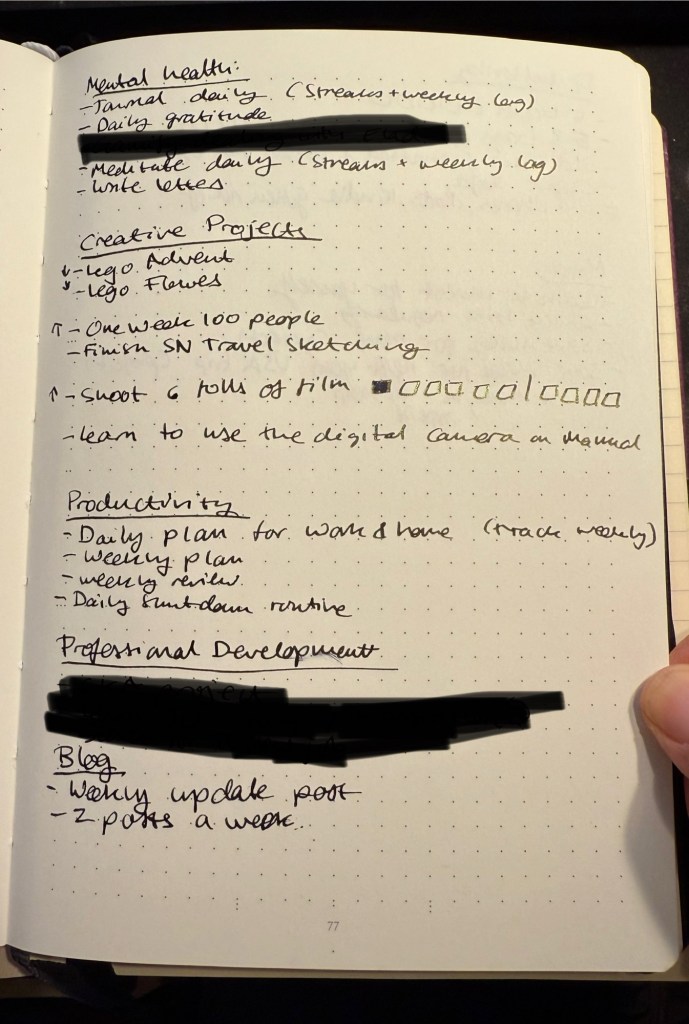
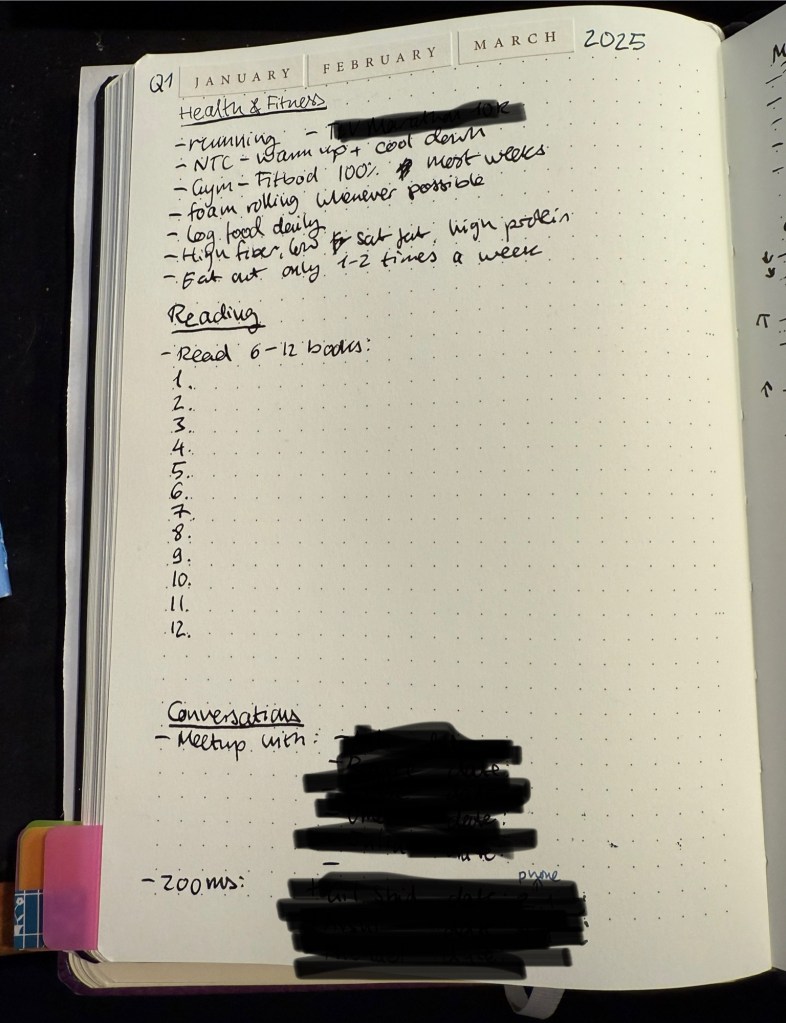
Page 1 of my Q1 2025 plan

I set individual goals for each category, all of them measurable, and this is the plan that I reference at least once a week, usually two or three times.

Wherever possible I set up the Streaks App and/or a tracker for the goals in my weekly plan. This makes sure that 60-70% of my goals are set on “auto pilot” and are included in every weekly and daily plan. I address the rest of my goals either when I plan my week, or not at all.

Wait, what?

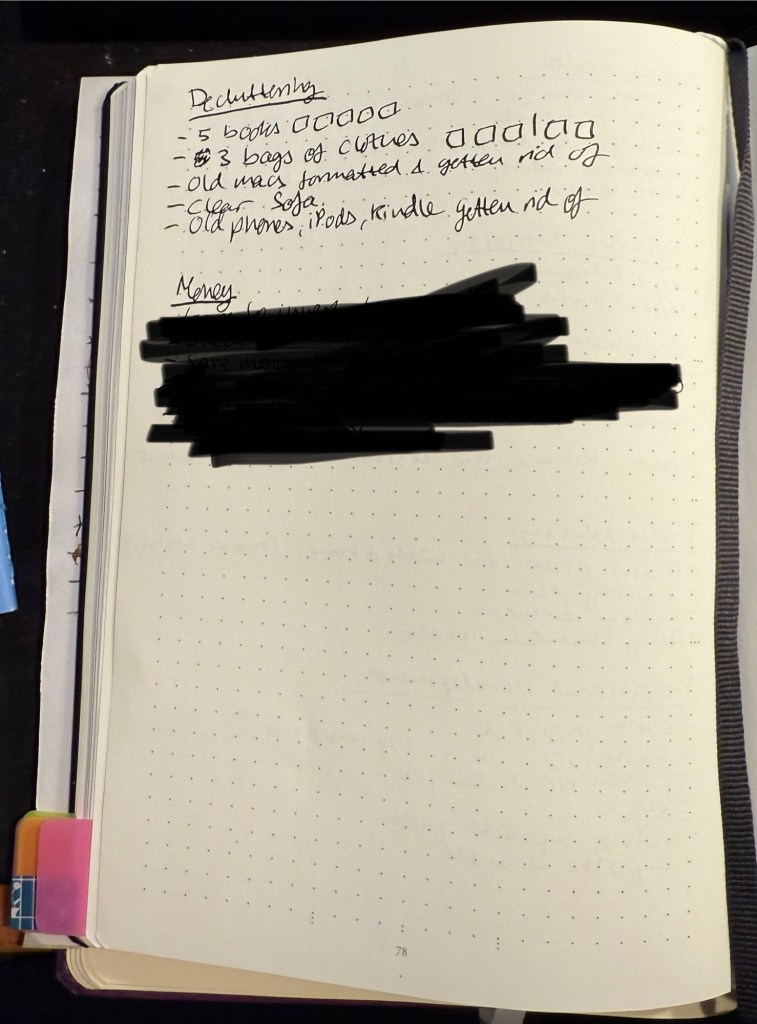
Page 2 of my Q1 2025 plan

I deliberately include goals that I know that I will have to stretch or significantly stretch to get to every quarter. Why? Because I view these goals not just as a plan, but as a call to action, a bit of a challenge. A good quarter is one where I got to 80% of my goals. I great quarter is one where I got to 90% of my goals, and if I ever get to 100% of my goals, then I’ve likely not been ambitious or creative enough when setting them.

Page 3 of my Q1 2025 plan.

Life tends to throw us curveballs, and so I leave wiggle room in my plan (there are goals that I mark ahead of time as less important, and entire categories that I’m willing to neglect if things get to that), and room to recreate the plan from scratch if the need arises. The plan works for me, it’s a tool that I use, it’s not something that I have to tie myself in knots over. I refuse to beat myself up for missing a goal, because if I missed a goal it just means that:

  1. It was poorly planned.
  2. Circumstances/context significantly changed (a war broke out, a pandemic broke out, a family member or I got non-trivially sick, I got injured, etc).
  3. It was a “stretch goal”.

In this case I expect myself to rethink my goals and what I want to achieve, and replan them.

A bit about my current categories and how I planned out each one:

  • Health and Fitness – the most “auto pilot” of my planning categories and absolutely non-negotiable. I’ve been working with largely the same goals in this category for months and sometimes years, so this is the quickest and easiest category for me to plan. It’s also one where I have the most trackers set up for: there’s a tracker for my running, swimming, gym workouts, NTC workouts and food logging. I use various health and fitness apps that track these, and the Streaks app to make sure that I work on this category daily. As a cancer patient in remission, I am not messing around with my health or my exercise routine. It’s also a must for my mental health, even though that’s tracked in a different category. If possible I try to have a road race to train for each quarter, though usually I only have 2-3 races a year, and last year I only had one. The food logging is something I do to make sure that I’m getting the fibre, protein, calcium and other nutrients I need, and keeping my saturated fat and sodium intakes relatively low.
  • Reading – pretty self explanatory, this category has been with me for years. I try to read between 2-4 books a month, and this reflects this.
  • Conversations – this category is all about having real conversations with people – not just liking their posts and messaging them. I set a goal of meeting certain people face to face for coffee, a meal or any sort of outing, and another for talking with friends that are abroad on zoom. Beyond this I have weekly recurring goals of calling people – usually between 1-3 friends a week. Yes, you need to schedule and track this. You’re busy, it’s easier and less risky to message people and so we stop calling them or meeting up with them, and we trick ourselves into thinking that these messages are the same as having a real conversation with these people. It’s not the same. It’s worth investing time and effort into this, I promise. Even if you have social anxiety, even if you’re very busy. I’m going for a minimum of six 1:1 get togethers with friends, and 3 zoom calls (though I’ll likely get 5-6 zoom calls in).
  • Mental Health – most of this category is automatically tracked in the Streaks app and is part of my daily plan and daily routine. I suffer from cancer related PTSD so I don’t neglect this stuff. If I do the panic attacks return and I physically dread them, so this, like the Health and Fitness category, is a non-negotiable category. It always happens. What goes in here? Journaling, daily gratitude (goes in my journal), meditation, and other things that I may write about later in a separate post.
  • Creative Projects – this is a fun category, and it’s here to remind myself to enjoy my life. It included sketching goals, Lego building goals, photography goals, etc. I try to get at least half the things in this category done.
  • Productivity – this is here mostly as a reminder to plan every day, plan my week, and perform a shutdown routine on workdays so I don’t think about work when I’m not at work.
  • Personal Development – these are professional personal goals, usually tied to learning new skills or obtaining a certain certification.
  • Blog – I used to track this as part of my creative projects, but as I ended up neglecting this blog for a month or two last year, I separated this to its own category so that I can give it more focus. This is tied to a weekly tracker and just tracks the amount of posts I publish a week.
  • Decluttering – lists things that I want to get out of my house over the next quarter. Simple enough.
  • Money – this is a list of money related things that I want to take care of – pension and investment reviews and plans, saving up money for certain goals, reducing certain bills, etc. This is a useful category because if you’re anything like me then this is something that you dread and will put off unless you force yourself to be really on it.

Since I’ve been working with most of these categories for a long time and since many of them are repeatable, much of my planning is just reviewing and copying over last quarter’s plan. The rest of the plan is things that I put a bit of effort into researching before I commit to, sometimes drafting them a few times before settling on my final quarterly goals.

I hope this inspires you to create your own quarterly plan. Let me know if it does and if there’s anything else you want to know about my planning setup.

Planning Update – How I Plan a 13 Week Year

This is the second post on this topic. For an explanation on the 13 week year read this post.

As life tends to constantly throw curveballs at me, planning ahead in short bursts has proven to be invaluable. During the previous quarter my dad went through an unexpected open-heart surgery and I realized that I’d have to find a new apartment in the not so distant future. If I had planned ahead for an entire year (goals/themes, the system is immaterial), I would have had to scrap all my plans on February. As it was, I made a few minor adjustments, and finished not so far from where I originally planned.

Just before this 13 week/quarter started I got some bad news about my cat. That’s going to affect my plans, which I made before I realized that he was likely dealing with cancer. That’s OK – my plans are short term enough to allow me to easily change them, and I’ve already built plenty of wiggle room into the plans that I made. Unlike themes, which I find to be to vague to be useful, or yearly plans, which are too long term to be practical in my circumstances, 13 week planning allows for just enough time to make meaningful progress in the key areas of my life whilst being short enough to allow me to quickly pivot if necessary.

How I Make a 13 Week Plan

This is my third round with 13 week planning, and I’m getting progressively better at it. Here’s what I do that’s been working so far:

  1. List all the roles and areas in my life and make sure I’m covering all of them. Some examples of the areas I use: Health and Fitness, Reading, Mental Health (important enough for me with my PTSD to have it under a separate area), Conversations (meaningful connections with friends – that’s face to face get togethers or one on one phone calls or zoom meetings, not WhatsAapp messages), French, Creative Projects, Film Photography (more on that in a separate post), Professional Development (this is the only work related stuff that I track at home), Decluttering (trying to prepare for a future move), Drawing, Blog, Money. Yes there are a lot of them, yes it’s worth listing everything down and addressing as much of it as you can with your plan.
  2. Figure out measurable goals that can be reached during the 13 week stretch. Where possible I set a bare minimum, easily achievable goal, and then stretch goals. So for instance the minimum reading goal is 6 books, with 8 books and 10 books as my stretch goals. This means that if the unexpected happens, it’s almost always only my stretch goals that are affected. It also means that I’m not setting myself up to say: “this is impossible, why even bother?” Every little bit helps, and it helps to be kind to your future self.
  3. Set up various scaffolds and aides to your goals. Wherever possible I use the app “Streaks” to help me hit my goals. I also use the great NRC (Nike Run Club) app to help me keep track of my running goals and challenge me there, and I schedule as many things as possible in my calendar ahead of time. GoodReads has a reading challenge that helps me track books. Then there is my weekly planning session, where I build up next week’s plan. During that time I go over all of my goals for the quarter and make sure that I’m hitting at least a few of them that week.
  4. When executing your plan, break things down to monthly, weekly and daily goals. Whether it’s X amount of running sessions a month, X minutes of exercise a week, or how much time you spent away from screens every day, the longer term goals need to be broken down to shorter term chunks for you to actually be able to do them. It’s also helpful when reviewing your weekly or monthly plan to see where your quarterly (or 13 week) plan was too optimistic. If, for example, you’re travelling for two weeks in August, you need to make sure you didn’t account for those two weeks during your quarterly plan, because chances are you won’t be able to hit very many goals during that time.
  5. Don’t be afraid to refactor the plan when major things happen. Your plan should be flexible enough to account for the small and medium sized surprises life throws at us (broken fridge, out of town friend unexpectedly drops by for a few days, you picked up a new hobby), but don’t be afraid to rethink your plans when the big things hit (major illness, unexpected move, promotion, job change, etc). You don’t score points for sticking to the plan – the plan is just a tool meant to help you achieve your goals.

My planning is done on paper, and then I use Fantastical (a calendar app) and Streaks on my phone to help me keep daily track of things. I look at my weekly plan almost every day, and I track things there as well. On a weekly basis I review my progress and decide what to focus on next week. If it’s a busy week I’ll select only a few relatively easy goals, for example. The point is to build a plan that is detailed enough to cover the most important areas in your life well, and yet allows for flexibility.

A small snippet from this quarter’s plan

Have you found this helpful? What tools do you use to achieve your goals?

2024 Planning Update: The 13 Week Year

Back in January I wrote about trying a new long term planning system that isn’t the Theme System or theme based, and isn’t yearly goal based, but rather is based on breaking the year into four 13 week blocks, each one representing a fully independent quarter.

I’m now in week 11 of the second of these blocks (quarter two, to put it more simply), and I’m starting to plan the next quarter. While working on my plan I thought that it would be useful to document the procedure, talk about my review process, and discuss how I planned the previous quarters, how things went, and what I plan to do differently in the third quarter.

The point of this system is to break the year into more manageable parts. This allows for greater flexibility in planning, time to “recover” from life’s surprises, and time to work on meaningful, long term projects. On the one hand the entire year isn’t a wash when life deals one of its blows, and on the other hand you can allow yourself to express a realistic amount of ambition.

Starting the Third Quarter’s Setup

I use the Leuchtturm Bullet Journal for my planning, and it should last me to the end of the year. After that I’ll switch to a Leuchtturm 120gsm dot grid notebook, as I don’t use any of the Bullet Journal features in my current notebook.

The first bit is a bit mindless, but I prefer to see it as meditative. Each week in my planner gets two pages, and so I leave four empty pages after the last spread of the previous quarter. These four pages will contain my plan for the quarter, broken into various sections. More on how I build that in a later post.

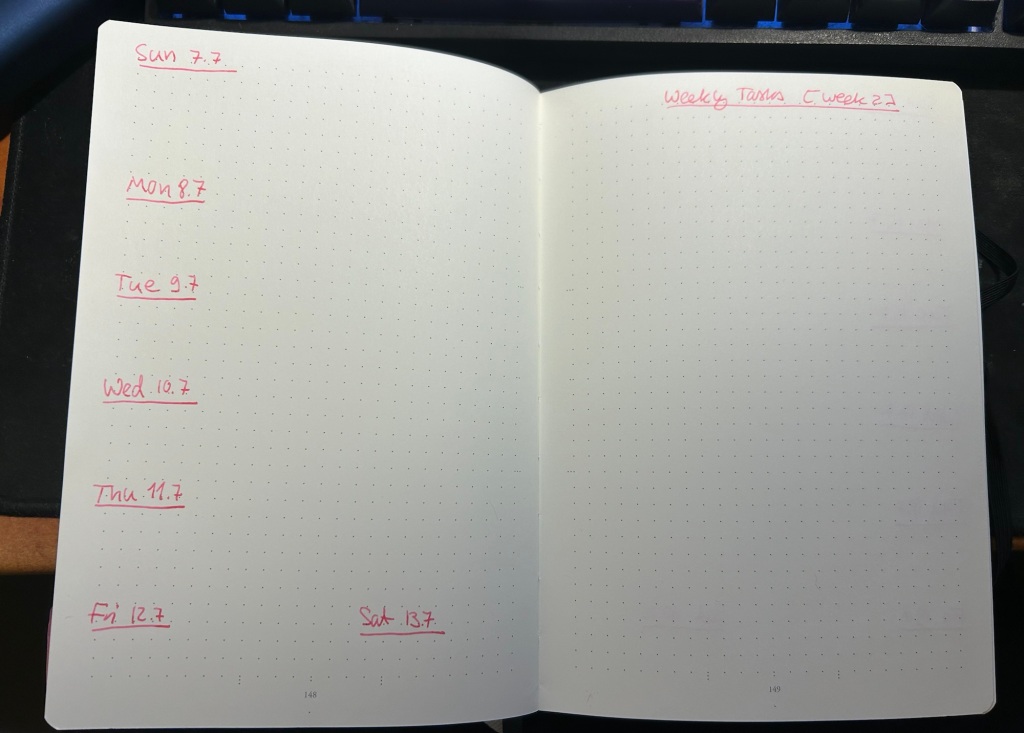
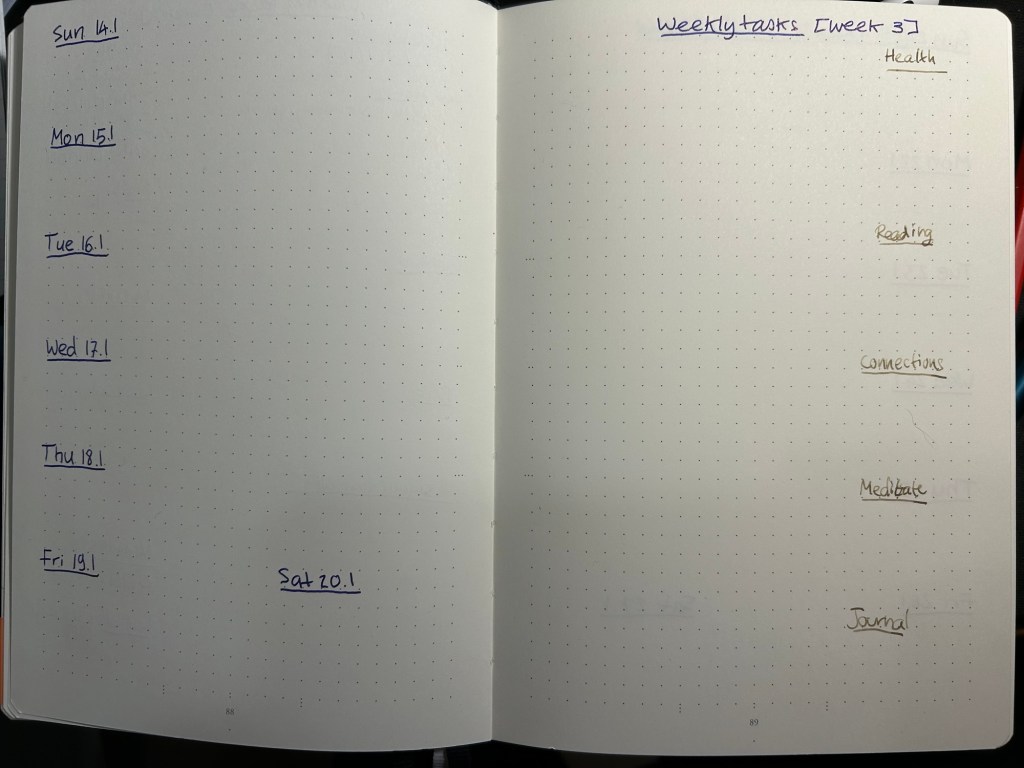
Then I sit down and draw out 13 weekly spreads. On the left side of the spread I write down the days of the week and the dates, and on the right I just put a “Weekly Tasks” title with the number of the week in the quarter in square brackets. I do this in one sitting for the entire quarter, and it takes about 30 minutes because I don’t rush it. This is how the pages look at this point:

This is how it looks when it’s filled and in use:

The left side gets filled with my exercise plan for the week, major appointments, and important things I don’t want to forget.

The right side has my weekly goals, both in the form of various checklists with checkboxes and more general lists. This is where my quarterly goals get put into action – every Friday or Saturday I look at my quarterly goals, and then try to advance as many of them as I can in the week. Things become more quantifiable at this point, though it’s often only in my daily to do lists that they become real, doable tasks. My daily to do list is something that I write the night before on an A5 loose sheet of paper, and recycle once I’m done with it.

Next time I’ll post a bit more about how I create the quarterly plan.

How do you plan your year? How is your planning going now that the year is halfway through?

Adventures in Time Blocked Planning

With time blocked planning the idea is to break down your day into blocks of time where you do things. The point is to structure your day so that you’re never faced with the question of “what do I do next?” Instead you sit down ahead of time and block out large sections of time where you do a specific large task, or bundle together a group of small tasks. You don’t block the day out into a minute by minute plan, but instead work in blocks of at least 30 minutes and usually 1-2 hours.

The idea isn’t new, and I haphazardly gave it a try when I was a student, and not surprisingly I failed spectacularly at it. It was only very recently when I decided to give it a serious try. The reason I decided to give time blocking a try was to solve a problem that I think is pretty common: I’d run out of steam about two-thirds into my day and end up just vegging out in the evenings, not accomplishing what I wanted, not even consuming the sort of media that really interested me. There’s only so many decisions my mind could make throughout the day, and late in the afternoon I would run on empty.

Since I was already “front-loading” my day (i.e. doing the really important work first thing in the morning or as early as possible) it was pretty easy to see the benefit of deciding what to do at a given point of time early on in the day, or even the night before. My issue with time blocking in the past had been that my work day is inherently unstructured. I may plan to work on something in the morning, but then a slack message or an email comes in, or someone bursts into the room with a problem and suddenly I’m working on something completely different.

Here, however, is where maturity kicks in. When I gave time blocking a chance years ago, I didn’t really take it seriously as an approach to work and life. Once something interrupted my day (and something always interrupted my day), the plan went out the window never to return. The plans rarely survived until lunchtime, and very quickly I decided that there was little point in time blocking for people like me. What I failed to realize at the time was that the majority of people are people like me: we live in a world where we are constantly being interrupted, and rarely does the day end in the way we envisioned it at the beginning.

Given this new found realization, and the realization that some very smart, very accomplished people whose work I follow use time blocking successfully and consistently, it was clear that the issue wasn’t with time blocking itself but with how I was approaching it. So I decided to make a more consistent, serious attempt to use time blocking for at least a month or two and see where it gets me.

I’m still very early into the process, but I decided to write about it as I go along, so I’ll have a record of how I tweaked things, and for those who like me, wanted to try time blocking but have failed in the past. Maybe my successes and failures will help them in their journey.

The First Mistakes

I started out with two mistakes, one easily fixed and another a mistake that I’m still working on correcting. The first mistake was trying to create separate time blocks for my work day and my “home day”. That failed spectacularly. Lesson learned: you need to follow one timeline, one plan, from waking up until going to sleep. If you use two different plans you are setting yourself up to fail because you’re creating two points in the day where you have to switch plans. While the morning switch may be relatively easy, by the time you’re off work you don’t feel like opening a different notebook or calendar and seeing what it is exactly that you’re supposed to be doing right now. I kept my home plan on a Rhodia dot pad and my work plan on a Moleskine squared notebook, and it just didn’t work for me. I had to carry two different plans with me, I had to reference and cross reference them, it was a mess. Now I have one plan per day, on a Rhodia dot pad.

The second mistake is one that I’m still working on correcting, which is what do I do when things don’t go as planned. What I should be doing is taking 5 minutes and replanning the rest of my day basically from that point onwards. What I currently do and doesn’t work well is either try to get back to the plan the moment I can (at which point things start to fall apart pretty quickly), or try to make only minor adjustments to the plan. The reality is that if there’s a significant break in my plan (i.e. something that takes more than 30 minutes to deal with), then I need to take a few minutes to stop and completely reassess my day. No, I will not be able to fit everything I planned into it now. Yes, my energy reserves are most likely more depleted at this point than I originally planned. Rather than trying to stick to the plan and crashing and burning, I need to be kinder to myself and look at what’s left of my day with fresh eyes. “That production outage took a lot from me, so let’s switch things up so I have a lighter workload until I’ve had a chance to recover, maybe even schedule a significant break here. Then rebuild my evening so I also have a bit more recovery time then – add a meditation session, or more reading time, etc.”. This is something I’m currently working on doing consistently.

The First Successes

While I’ve been time blocking only for a short time, I have already seen the value of this system. I’m getting much more done, and I am able to dedicate long stretches of time focused on meaningful work. I batch emails to the beginning and end of the day, and slack messages only to the times between large blocks of deep focus. I haven’t had an episode of mindless YouTube watching in the evenings since I’ve started. I’m reading more, journaling more, meditating more, spending more meaningful time with friends and family. I’m also being much more realistic about my goals. Once you start putting things in the context of the hours you have in the day, it becomes easier to assess how much you can get done in a given day.

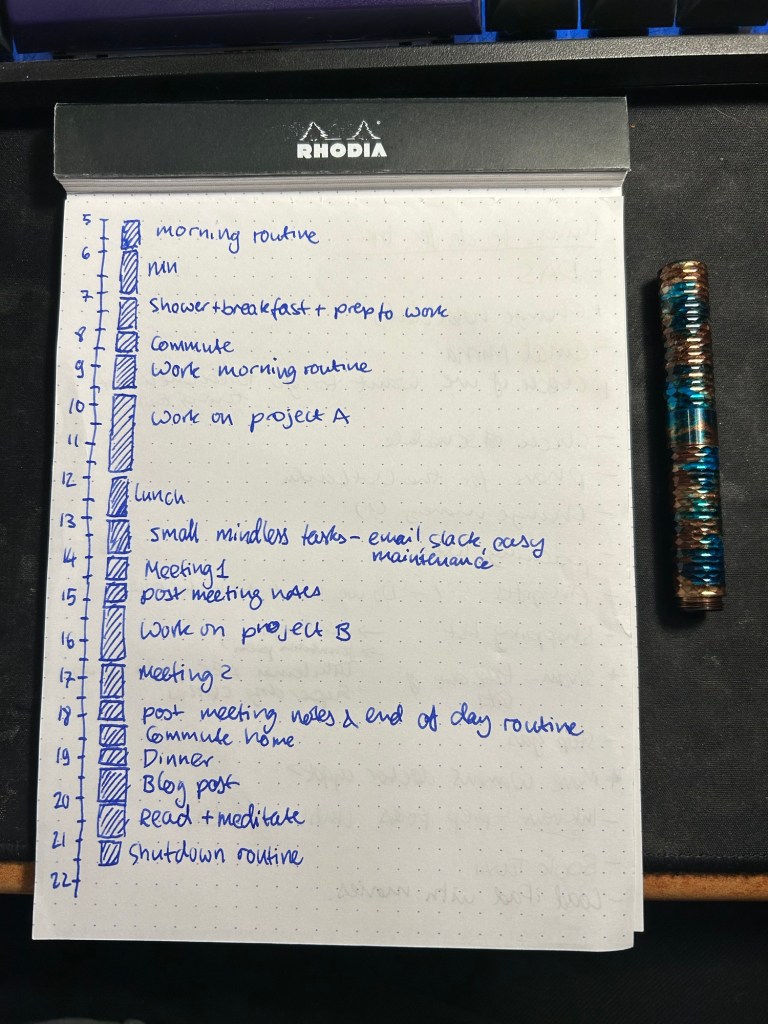
A sample of a time block plan.

It’s not just a result of the time blocking itself, of course. It’s also the way I’ve structured my year, a commitment to deep focus and digital minimalism which mean no social media, no mindless media consumption, more reading and more deliberate practice of the things that matter to me. I’m also far from reaching a point where the way in which I time block my day is stable, well-defined routine. Things are still shifting around as I’m recording in my journal what worked and what didn’t work. While I’m not looking for perfection, I do want to reach a point where I have a system that works for me (and not I for it), and that helps me better shape my days.

I’ll be writing more about time blocking in the future, whether my experiments with it succeed or fail. If you’re giving it a try or use time block planning regularly I’d love to hear your thoughts on it in the comments.

Planning in 2024: The 12 Week Year

It’s 2024 and this time I’m doing neither yearly goals nor themes. I find themes to be too vague to be useful: they don’t provide enough structure or motivation for my needs. My old yearly goals worked perfectly before I got cancer, but now I can’t commit to a full year of goals (my brain just won’t let me). So I’m trying something new this time: the twelve week year. The idea is to treat each quarter as a new year, with all that entails.

I mapped out the first 13 weeks (from the 31st of December to the 30th of March) in my Leuchtturm1917 Bullet Journal, each week on two pages. On the left are the days of the week and on the right is my set of tasks for the week. The list of tasks is divided into two columns, and each column is divided into categories. The left column is for categories and tasks that vary widely from week to week: blogging, general tasks, various courses and challenges I’m taking. The right column is for my permanent categories that happen every week in the quarter: health, reading, connections, meditation and journaling.

The weekly layout

The health category tracks fitness and health related tasks (on a given week it will have checkboxes for running, swimming and gym sessions for example, as well as reminders to go to the dentist or get my blood pressure checked). The reading category is for where I want to be with my reading in a given week (halfway through book x, 30 pages into book y). Connections is something I added after reading Cal Newport’s Digital Minimalism and it’s been well worth doing: I call or meet up with 2-4 friends every week. Messaging doesn’t count, only phone calls, zoom calls, or physical meetups. If there’s one habit I’d recommend picking up in 2024 it’s this one. Meditate and Journal are just tracking locations for my meditation and journaling sessions.

I then set out goals in various categories for the entire “12 week year”, as if it was a full year. Each of these will be evaluated at the end of the 13 weeks, and a complete new set of goals will be set for next quarter. The goals are all SMART goals: specific, measurable, achievable, relevant and time bound. Unlike themes there’s a possibility of not achieving all my goals, but that’s also something worth learning and carrying on to the next “year”.

So for instance under my health category for the next “year” is to get back to a 5k running base and an 8k long run (I’ve had a break in running for a few weeks due to illness and travel). If at the end of March I’m only at a 7k long run that’s not the end of the world, it just means that I need to take that into account when planning my next 12 weeks.

I then break down the goals into tasks that go into the weekly page. Each week I look at my goals, calculate where I am and where I want to be by the end of the week and fill out the weekly planning page accordingly. I use the calendar side of the page to block out time sensitive things or things that provide useful context (days of the week where I work from home and those where I work from the office, rainy days, holidays, etc).

To be clear: I don’t block the tasks for all the “year” in advance, but rather on a week by week basis. Only the goals for the entire 12 week period are planned in advance. The goals themselves are realistic, and many of them are broken into “base goals” and “stretch goals” much like in Kickstarter. At the last week of the quarter I set aside time to review and “shutdown” the quarter and plan and set up the new one coming up. If I end up not liking the weekly page setup, if there’s a goal that just didn’t work for me, if there’s something new in my life I can easily take it into account without feeling like I’ve “wasted” precious planning time or I’m bailing out on my plans.

So, if you’re unsure on how to plan your year, I suggest just planning the next 12 or 13 weeks. It may just work for you.

Ghosts of Planners Past: GTD and Friends

This is probably going to be the hardest post to write in this series, and so I’ve been postponing it.

I got into Getting Things Done around 2005, when it was really starting to gain momentum with tech workers online. I first heard about it via PvP Online’s creator, Scott Kurtz. Yes, I found a productivity and planning system via one of the first webcomic creators. The internet is funny that way.

Notes from 2011 on doing GTD better

If you have no idea what GTD is, then I suggest starting here. It’s a 15 minute guide to David Allen’s all-encompassing planning and productivity system. If it resonates with you, then the GTD book is pretty good for a book in the productivity genre. Books in this genre tend to be repetitive, padded with anecdotes, and oftentimes poorly written. The GTD book is readable, and while it contains the inevitable productivity guru anecdotes, there aren’t very many of them.

There are a few things to note about GTD that set it apart from other productivity systems, and make knowing about it worthwhile:

  • While it was developed for a paper office based world and appears on the face of it to be very rigid, it is in fact extremely customizable and flexible, and it converts very well to digital planning and to do list systems. Many of the most popular to list applications have their roots in GTD, for good reason.
  • While it was developed for an office setting and busy executives, it easily works well for students, designers and other creatives, developers, teachers, and just about anybody that doesn’t lead a leisure filled life. If you have “stuff to do”, if you feel overwhelmed, then GTD in some form or another could very likely help you.
  • This system spawned dozens and dozens of other systems. You can see the roots of GTD in BuJo (Bullet Journalling), there’s a monster list of GTD implementations, and 43folders (Merlin Mann’s old productivity site) is full of info on various GTD tweaks and variants. This, by the way, is my favourite one.
  • The basics of GTD are worth implementing no matter which system you use, because they just work, and because they will likely fit whichever system you use. They are:
    • Make a list of all the things you have on your mind that you need to do. They need to be actions that you can perform in the real world, and you need to be able to clearly envision what “done” means.
    • Curate that list – make sure that things on it are actually ACTIONS that you can take IN THE IMMEDIATE FUTURE. Break big tasks into little ones, things that you are able to do it small chunks of time. Make sure there aren’t any hidden dependencies or prerequisites to these tasks. Make sure you know what DONE looks like. Make sure that they are REAL and actually need to be done, and need to be done by YOU. If things on that list take less than 2 minutes to do, just do them. T
    • Go over that list and do the things. If you’re stuck, make sure the thing was properly defined and isn’t a hidden project (i.e. isn’t actually one task but rather 20), something that you can delegate or not do, or something that you can’t start working on now. If you’re balking at doing it open a timer (the famous pomodoro technique enters here).
    • Once a week prune the list. Be ruthless.
    • Don’t schedule anything on your calendar unless it absolutely has to be on your calendar – a doctor’s appointment, a child’s graduation, an exam date, etc.
  • You can get carried away by GTD and become more interested in the organizational part of it (“Productivity Pr0n”) than in actually getting the work done.

The last bullet is what earned GTD a place in this blog post series.

I love GTD. I’ve been using it in various form for almost two decades. I have the book and have read it twice, and I have a good grasp of the major players in the GTD cinematic universe. I know the system well enough to be comfortable to get rid of its mannerisms and streamline it to my own needs. I can see its influences in Jira, in BuJo, in Omnifocus and other to do apps. And it’s very powerful dark side is that it really invites you to tweak and tinker with it. You are tempted to make your system a little bit sleeker, better, more efficient, better suited for your needs, to the point where you suddenly find yourself spending more time and care on the system than the tasks that it is supposed to help you manage. So while GTD taught me how to define and manage my tasks, it also taught me to be constantly aware of how much time I’m spending on my task management systems.

So if you are worried about being carried away by GTD’s siren call to tweak, tweak, tweak, here are some basic ideas from the system that I think are worth taking with you or thinking about no matter what:

  • Our minds aren’t good at keeping track of things. Write them down.
  • Not everything is a real task. It if it isn’t an action that you need take in the world, then it needs to be trashed/delegated/better defined.
  • Tasks that languish in your planner/to do system are either ill defined (see bullet above) or require deliberate action to get out of the way (see pomodoro technique, dashes and timers).
  • Don’t clutter your calendar. It just adds needless stress to your life.
  • The best definition of a task is a physical action, that can be accomplished at a sitting, supports valuable progress towards a recognized and desirable goal, and something that YOU are the most appropriate person to perform.

Ghosts of Planners Past: Chronodex

As I’ve been struggling with planning ever since I received a cancer diagnosis in mid 2021, I’ve been reflecting on the many planner systems that I’ve used over the years. Most of these systems didn’t stand the test of time for me, but I think that there’s still something to learn from their failure. So while I’m working out how planning looks like for the new, post-cancer treatment me, I thought that I would write down my reflections on each system that I have used.

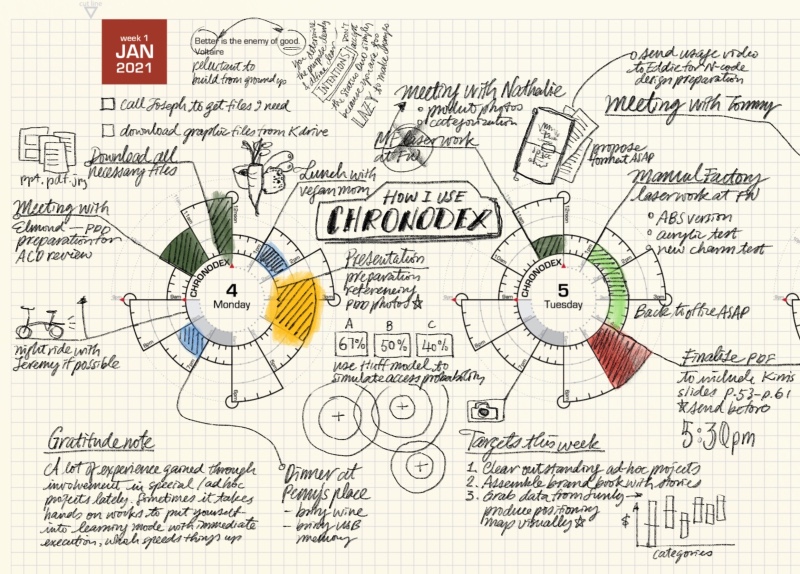
Image by Patrick Ng from Scription

I love planning, I’ve always loved planning, and together with many analogue systems I have tried quite a few to do apps over the years. Analogue planning systems, while sometimes cumbersome, always worked better for me, which is why that’s what I’ll focus on in this short series of posts.

I first discovered Chronodex, Patrick Ng’s gorgeously visual planning system, when he first published it in late 2011. It immediately appealed to me because it was so visual, and I’m a visual thinker, and it was so very different from anything else that was going around in the planning world at the time. This was well before the days of various bullet journal tracking pages, in the heady days of GTD and the Fountain Pen Network. The Rhodia Webnotebook was new and exciting stuff, and the Traveler’s Notebook was all the rage.

Patrick’s Chronodex was meant to be printed at home, 6 months of planning pages at a time, and then folded and cut to size to fit a Traveler’s Notebook. I tried to do that at first, and failed miserably. Home printers are terrible, and the result was unusable and just a waste of a lot of paper and inkjet ink.

Since I still really wanted to give the system a try, I went to the office supply store next to my job and bought a circle template ruler. Using that, a Rhodia Webbie and a Pilot Hi Tec C Coleto I created hand drawn Chronodex pages for a few months. I was a team lead at the time, I was overwhelmed with work and meetings, and I thought that visual time blocking as offered by the Chronodex would be the solution.

I really insisted on getting the Chronodex system to work for me, because I was so aesthetically enamoured with it. I pushed it until it broke and then I kept dragging it on for weeks before I finally realised that it was time to move on. The Chronodex wasn’t for me.

The system works on time-blocking, as drawn on a circular 12 or 24 hour template that is supposed to mimic a watch face. If you are a visual thinker you will immediately see the appeal. If you like pretty planner pages, you will also love the Chronodex’s elegant beauty. But planning for me has first and foremost got to work on a practical level, and the system faired poorly there.

If you have relatively few things to do throughout the day, or if your day is already time blocked (i.e. you are a student or a teacher) then the Chronodex could work well for you.

If, on the other hand, you have a lot going on, or you tend to have to jump around between tasks, or if your days aren’t so easily well defined in time blocks, then the Chronodex is likely not for you. It becomes too cluttered to be readable if you try to splice your day into small time blocks, and if your day is fluid and not well defined in advance, you aren’t going to be able to to time block it until you start to actually do the thing. The Chronodex isn’t a Pomodoro substitute, it’s the equivalent of having an old-school day planner with the hours marked on it, and chunking out your work and meetings in advance in your planner. It’s a great system for students, and for people who have a high degree of control and certainty about their day.

What I did take from Chronodex is the option to stop and visually time block my day when things are getting out of hand in terms of my expectations versus what I can actually do in the time at hand.

If you are at all curious about the system, I encourage you to visit Patrick’s beautiful site and maybe print out a page or two to try it out. Another option is to draw out the Chronodex circles yourselves, just to see if there’s anything in the system for you (don’t do it long term, though, as it takes ages). A third option is to go Etsy and search for Chronodex. There are dozens of stamps for sale with the Chronodex template on them.

Some Thoughts on Productivity Systems

In the beginning of the month I started working in a new team, in a new career path, in a new technical job, under new circumstances. After working for two and a half months from home, I now work half a week at home and half a week at work, in a pretty empty office. I haven’t met all my team members, as we work in separate “capsules,” ensuring that if one of us got sick at least 50% of us would remain unaffected and capable of working. After 17 years of being a Mainframe system programmer, I’m now a DevOps engineer. I’ve been training for the past six months for it, and I love the work, but it’s still not the easiest switch to make. I have a new set of managers, with a new management style, and my old job keeps calling on me, which results in some wild context switching.

And meanwhile the world is burning, as incredible stupid leaders worldwide decide that their pockets are worth more than other people’s lives.

I’m not a huge fan of change, and so my productivity systems tend to stay around with me for years. During the early days of the pandemic, when I just started working from home, I thought that this was temporary. On the second week I realized that the mess of notes in whatever writing pad was around would need to change. And my mindset would need to change.

I wasn’t in Kansas anymore.

I tried to replicate my old work setup at first (a large Moleskine squared hardcover with only the daily todo part of bullet journalling), keeping my home setup intact (a Field Notes with a running todo, lists, trackers etc). That held until I realized that I was starting a new job in a place that moved at a completely different pace than what I was used to. I was also no longer a manager, so the focus of my work was different. I needed to tear everything down and start over again.

I went back to digital task management. I’d tried OmniFocus for a while two years ago and didn’t like its complexity. I had used Things for a good long while before that but stopped and change back to a paper notebook once I decided that I had to have a physical barrier between work and home to have any balance in my life. Those were wild times, and I’m glad that I made that choice, but now it was time to bring Things back into my life. I’ve been using it since the 1st of June, and while it isn’t yet 100% set up to perfection, it’s working well so far.

I’m now managing both work and home from Things, because I can’t handle the added hassle of remembering to lug which notebook where every day, especially now, when I’m not yet set up in my new place. I also don’t realistically think that I could have kept track of my work in a paper notebook right now. I’ve “outgrown” it.

The issue is that I still love paper notebooks, and I still love writing with pen and pencil on a piece of paper. I still keep a pad next to me when I work and scribble ideas on it, but this switch has dwindled down my daily stationery use significantly.

As I was clearing my old desk I found physical evidence of all my years of work there: notebooks full of todos, meeting notes, project notes, ideas and problem solving pointers. I could see the work that I’ve put in. My new system is searchable, but it’s still an amorphous pile of bits somewhere in the Cloud.

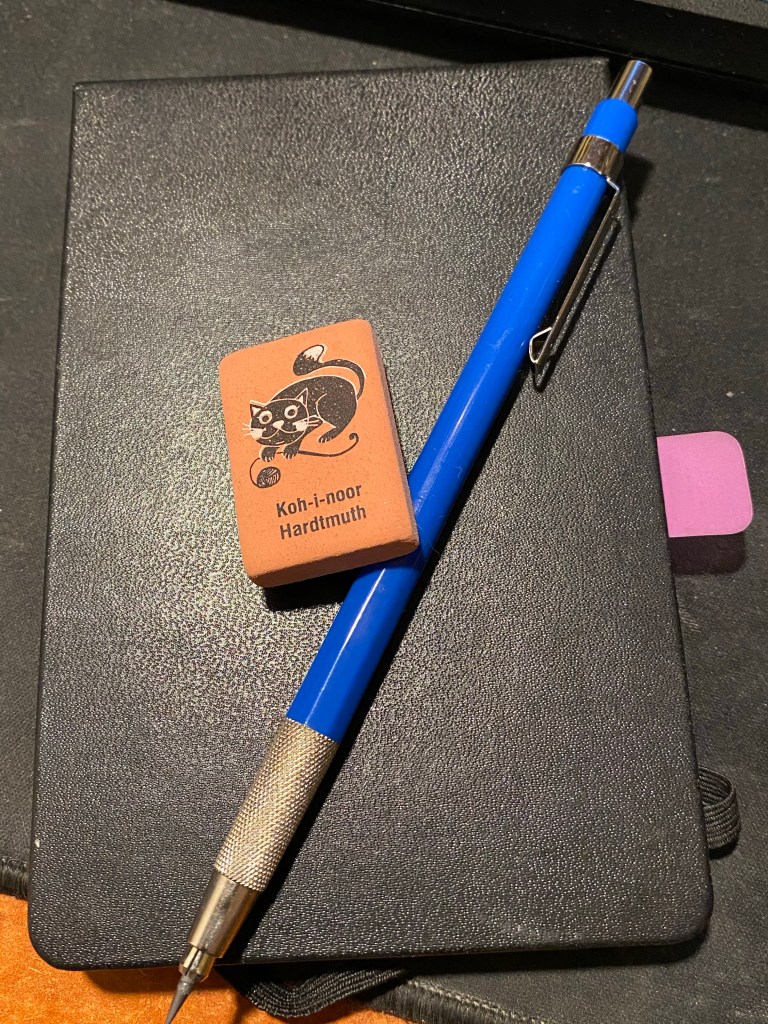
I don’t recommend this eraser. It’s just one that makes me smile.

When I went into quarantine I had an inexplicable yearning to get back to the first ever real productivity system I used, the PigPogPDA. I loved my Moleskine pocket plain reporter notebooks, set up just right, full of all the important information that I might ever need. I had shopping lists, trackers, drawings, story ideas, directions, packing lists, cheat sheets in those notebooks: they were my everything at the time. I also remember how terribly expensive they were for me, and how difficult to obtain. Every page was precious, and I had to be careful not to waste any. I used the Hi-Tec-C and the Staedler Mars technico lead holder for that, and these little notebooks lasted for ages and travelled the world with me. Only in the past three years have I stopped using them, replacing them with a much simpler system in Field Notes pocket notebooks. Out of nostalgia I brought one back to life. It has done a lot to cheer me up and give me a sense of stability during these hectic times. Yes, I know it’s just a notebook. Sometimes “just a notebook” is all it takes.

If I have any advice to offer it’s this: be kind to yourself and pick whichever system works for you, and doesn’t make you work for it. Pick something that you’ll enjoy using. If it’s a sleek app, let it be a sleek app. You’ll find use for the notebooks in your cupboard eventually. If it’s notebooks, then make them entirely your own. That’s the joy of using paper planning anyway. And don’t be shy of saying: “This doesn’t work for me anymore”.

So I’m back to digital planning, and I’m going to find a way to have fun with my pens and paper somehow (I still journal and draw and write after all). This is something that’s likely to change as the times do, my work and my life circumstances do. So long as I don’t fall into the trap of Productivity Pr0n and forget what all this is in service of, I’m fine.

I’m fine.

General update

  • My to do list today is 45 items long. It’s 10AM and I still have 33 items to go.

IMG_0642

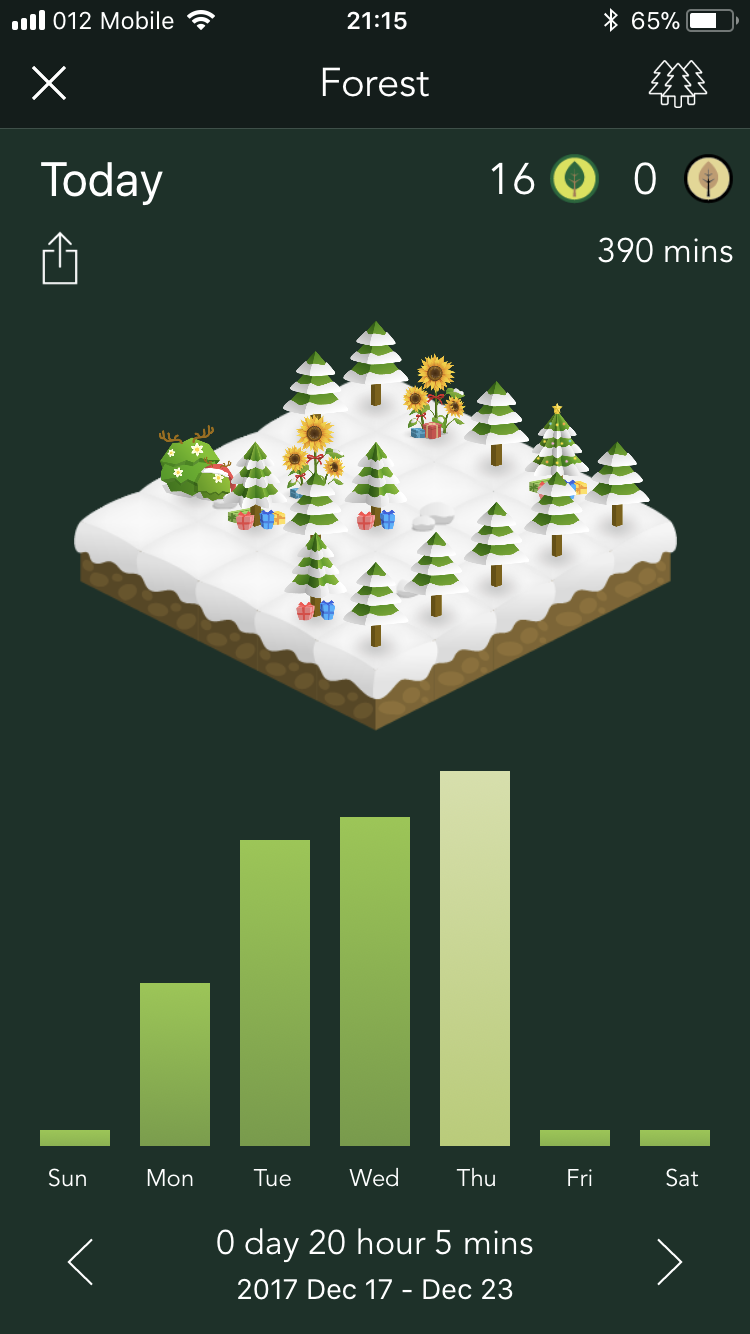
  • I’ve been using the Forest app for the past week to cut down on my phone time, and especially my twitter time. It’s a fun take on the Pomodoro technique that basically lets you set a timer to plan trees in your forest. The tree grows when you finish your timer without touching your phone (you can have the phone play music or a podcast while your tree is growing, you just can’t fiddle with your phone). You can also accept calls while the tree is growing, but you can’t make calls/text/check apps etc. It’s a good gamification of the Pomodoro technique, and a beautiful app.
  • I’ve finished rewriting chapter 2 and am back to rewriting large swaths of chapter 7. Forcing myself to cut ruthlessly cut things down.
  • Reading John Scalzi’s “The Human Division” and thoroughly enjoying it. Also indulging in M.C. Beaton’s “Agatha Raisin and the Haunted House,” because I can.
  • Started working on my 2018 resolutions. It’s the fourth year that I’m doing
  • My (mechanical) keyboard is creaking. It’s time to swap out the keycaps and lubricate the switches a bit.
  • Cutting down on Apple technology podcasts. Getting a bit fed up with them and more interested in podcasts with more interesting content than “guess how much I love my iPhone X”.
  • That being said, I upgraded to an iPhone 8 (not a Plus or a X on purpose), and I’m OK with it. Still frustrated that it doesn’t have a headphone jack.
  • Ran a game of Parsley that I wrote for a group of friends using Discord, and it was a roaring success. Planning on running another game like that soon.