Ghosts of Planners Past: Daily Planners

It was obvious that I’d discuss daily planners after I addressed weekly planners, right?

This format, in combination with some of the planning tactics that I’ll talk about in later posts, has been the one that I used the most over the years. Daily planners usually have a page per day, oftentimes with hourly notations on the side. Less commonly they have a page for planning and across from it a page for notes. Sometimes the page is divided into sections for various meeting notes, todos, etc. Daily planners tend to be the thickest of planners, unless they split the year somehow, or only cover part of it (academic year planners, for example).

This is a very old Filofax daily planner example that I had laying around. I’ll be posting separately about the Filofax system

I’ve used the daily format the most because it allows for the most room to think and plan in, and the main reason I plan on paper is for the space it allows me to sit with a pen in hand and a blank (lined/squared) page and plan the direction, location and movement of my tasks like a general ordering troops around in the army. Push this one until tomorrow or early next week, this one gets a little marker for lower priority, and this one for higher, etc. The marking methods that I use have changed a bit over the years, but the format that I prefer largely hasn’t. I can oftentimes plan two days on a page, but it makes things feel cramped. I’m giving that format a try now (two days per page), and I’m likely going to revert back to my beloved page per day format soon. Ideas need space to breath, and when tasks get cramped I tend to miss a few of them. They just run on into each other in a condensed wall of text.

Like with weekly planners, daily planners have obvious inherent downsides. They’re thick and heavy. Unless you’re making them yourself (which is what I’ve been doing for years), you’ll be made to feel bad with every day you skip in them. They also don’t allow to easily see the bigger picture: having all the space that the weekly planners lack, they pay for that with the inability of letting you get a feel for your week in a glance. You remain mired in the day to day, and need to purposefully remember to look ahead to see what’s coming tomorrow, the day after, next week.

This is the reason that for years I’ve kept two notebooks that I turned into planners, a daily one (which was much more heavily used) and a weekly one (which I referenced once or twice a week). This combination worked the best for me until I got sick and it crumbled. Perhaps it will work for me again.
Ghosts of Planners Past: Chronodex

As I’ve been struggling with planning ever since I received a cancer diagnosis in mid 2021, I’ve been reflecting on the many planner systems that I’ve used over the years. Most of these systems didn’t stand the test of time for me, but I think that there’s still something to learn from their failure. So while I’m working out how planning looks like for the new, post-cancer treatment me, I thought that I would write down my reflections on each system that I have used.

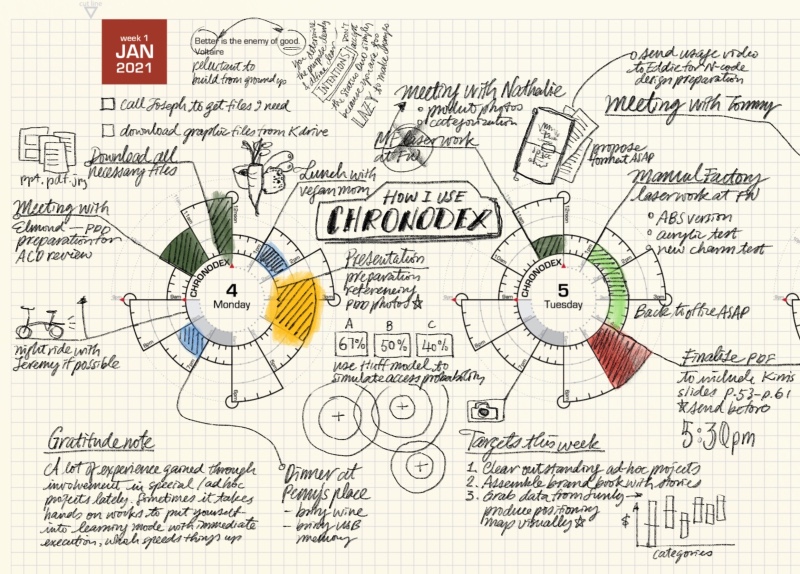
Image by Patrick Ng from Scription

I love planning, I’ve always loved planning, and together with many analogue systems I have tried quite a few to do apps over the years. Analogue planning systems, while sometimes cumbersome, always worked better for me, which is why that’s what I’ll focus on in this short series of posts.

I first discovered Chronodex, Patrick Ng’s gorgeously visual planning system, when he first published it in late 2011. It immediately appealed to me because it was so visual, and I’m a visual thinker, and it was so very different from anything else that was going around in the planning world at the time. This was well before the days of various bullet journal tracking pages, in the heady days of GTD and the Fountain Pen Network. The Rhodia Webnotebook was new and exciting stuff, and the Traveler’s Notebook was all the rage.

Patrick’s Chronodex was meant to be printed at home, 6 months of planning pages at a time, and then folded and cut to size to fit a Traveler’s Notebook. I tried to do that at first, and failed miserably. Home printers are terrible, and the result was unusable and just a waste of a lot of paper and inkjet ink.

Since I still really wanted to give the system a try, I went to the office supply store next to my job and bought a circle template ruler. Using that, a Rhodia Webbie and a Pilot Hi Tec C Coleto I created hand drawn Chronodex pages for a few months. I was a team lead at the time, I was overwhelmed with work and meetings, and I thought that visual time blocking as offered by the Chronodex would be the solution.

I really insisted on getting the Chronodex system to work for me, because I was so aesthetically enamoured with it. I pushed it until it broke and then I kept dragging it on for weeks before I finally realised that it was time to move on. The Chronodex wasn’t for me.

The system works on time-blocking, as drawn on a circular 12 or 24 hour template that is supposed to mimic a watch face. If you are a visual thinker you will immediately see the appeal. If you like pretty planner pages, you will also love the Chronodex’s elegant beauty. But planning for me has first and foremost got to work on a practical level, and the system faired poorly there.

If you have relatively few things to do throughout the day, or if your day is already time blocked (i.e. you are a student or a teacher) then the Chronodex could work well for you.

If, on the other hand, you have a lot going on, or you tend to have to jump around between tasks, or if your days aren’t so easily well defined in time blocks, then the Chronodex is likely not for you. It becomes too cluttered to be readable if you try to splice your day into small time blocks, and if your day is fluid and not well defined in advance, you aren’t going to be able to to time block it until you start to actually do the thing. The Chronodex isn’t a Pomodoro substitute, it’s the equivalent of having an old-school day planner with the hours marked on it, and chunking out your work and meetings in advance in your planner. It’s a great system for students, and for people who have a high degree of control and certainty about their day.

What I did take from Chronodex is the option to stop and visually time block my day when things are getting out of hand in terms of my expectations versus what I can actually do in the time at hand.

If you are at all curious about the system, I encourage you to visit Patrick’s beautiful site and maybe print out a page or two to try it out. Another option is to draw out the Chronodex circles yourselves, just to see if there’s anything in the system for you (don’t do it long term, though, as it takes ages). A third option is to go Etsy and search for Chronodex. There are dozens of stamps for sale with the Chronodex template on them.